Take your FTP client anywhere
FileZilla Client Portable is a free and standard file transfer protocol. It comes with a variety of features such as site manager, bandwidth controller, bookmarks, remote editing, and fast link function. FileZilla Client Portable can run from a cloud archive, hard drive, or local folder without being installed on a particular operating system. This safe file transfer protocol solution packs all of these capabilities into a dated and easy-to-use GUI, making your sessions powerful and seamless.
Top Recommended Alternative

What is FileZilla used for?
File managers like Google Drive, Dropbox, and Microsoft OneDrive are becoming increasingly popular among consumers. As a consequence, FTP servers are no longer a requirement. In some cases, you do need to pass data to your FTP client. For this function, FileZilla Client Portable allows you to perform updates seamlessly, set speed limits, and provides access to a server and a convenient site manager.
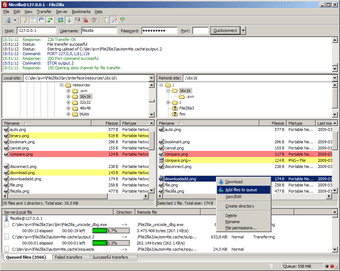
The first time you open FileZilla on your desktop or laptop, you’ll see that the interface appears dated. However, it packs a lot of functionality in a basic user interface. When launched, the software will show you two different windows, one of which will show you the local folder from where you wish to transfer files and the other the destination server.
The multi-window interface helps you to keep sight of your files as they move across the database. If you send files from your current archive, you can see them moving to a remote server, and vice versa. You will now be able to display a large window with the waiting time as well as a list of any jobs left in the queue.
How do I transfer files using FileZilla?
Many FTP sessions enable users to open a host site and enter port info, their username, and password. It renders this whole process very simple with the aid of the QuickConnect feature. To use it, all you need to do is open the host site, enter the necessary details, and press the QuickConnect button. After that, once you access the platform, all the data will be inserted automatically.
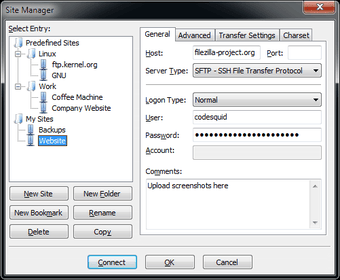
You may need access to many websites if you use FileZilla FTP daily for data transfers from your computer to another server. The transition protocol program offers a simple site planner for such cases. This functionality helps you to save all the links from the websites you regularly visit, along with the information you need to log in to your account. You can press and hit Connect once saved on the site link.
FileZilla Client Portable offers a feature for exchanging files with users. It's similar to files on cloud storage applications that can be shared. It functions as a server to encourage you to upload your documents, but only Windows users have access to this feature. Its biggest downside is that FTP sessions are outdated. There are other variety of tools, such as FlashFXP, CuteFTP, and Cyberduck, if you regularly use FTP clients.
Transfer files without limit
You can download FileZilla Client Portable if you are looking for a basic FTP client. The software features functionality that makes it easy and convenient to move files via FTP or SFTP sessions. All jobs can be seen in a queue, all login information can be stored in one place, and a host of other resources are used, to enable the transition.